Set the Output by Writing Code
You can set the output by writing programming code directly.
In the template’s edit screen, click a row of the field definitions to open “Edit (item name)”, and in “Default value” > “Detail (order info, code)”, set the type of value to “Code (JavaScript)“.
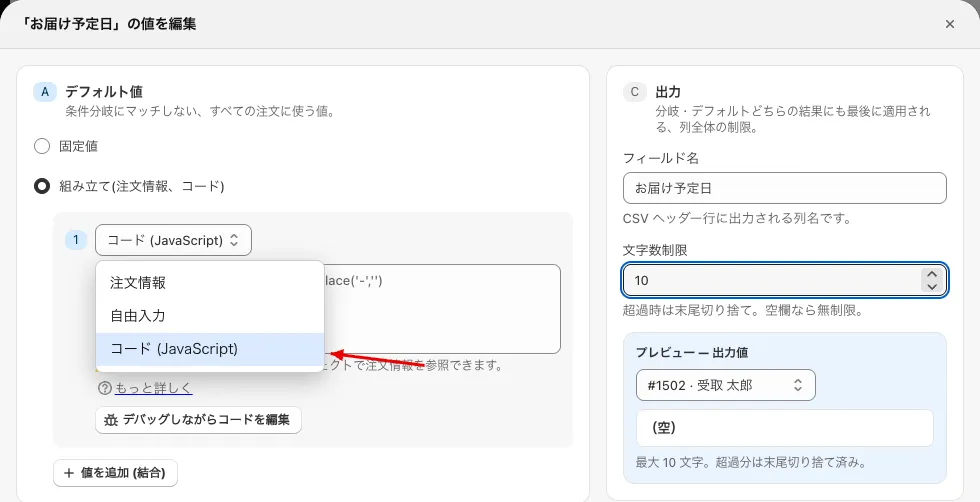 Choose “Code (JavaScript)” from the value types (“Order info”, “Free text”, “Code (JavaScript)“)
With “Edit code with debugger” you can also edit the code while checking its result with the data of an order.
-
With code you can access the order variables directly and do things such as numeric calculations. See the list of order variables (Japanese).
-
The following function is provided for date calculation.
const dateCalculate = (
  dateStr: string | Date,
  num: number,
  format?: string
) => {
  const d = dayjs(dateStr);
  if (!d.isValid()) return "";
  d.add(num, "day");
  return d.add(num, "day").format(format || "YYYY-MM-DD");
};
day.js is used for date calculation and formatting, so see here for date formats.
-
For example, you can write as follows.
By changing the number you can calculate +x days or -x days.// Calculate from the desired delivery date dateCalculate(order.date, -5, "YYYY/MM/DD") // Calculate from today's date dateCalculate(new Date(), 5, "YYYY/MM/DD")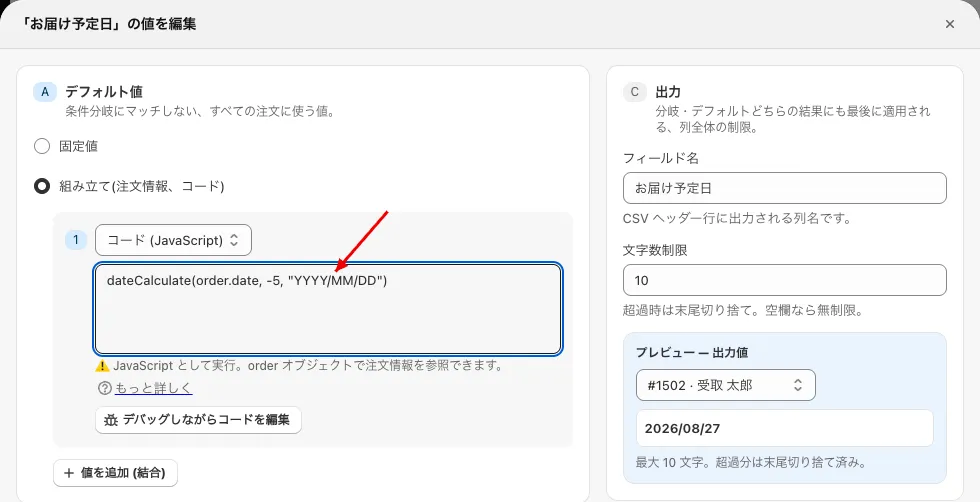 The value edit screen (the result is shown in “Preview — output value” on the right)
 -
The result of
dateCalculate(order.date, …)depends on what the order has as its desired delivery date.- Orders whose desired delivery date is a date: the date calculated from that date is output.
- Orders whose desired delivery date is a string such as “No Request” (“指定しない” / “指定なし”): it cannot be read as a date, so an empty string ("") is output.
- Orders with no desired delivery date at all (no value): the date calculated from today’s date is output. It does not become empty. To give such orders a different value, add a branch in “Branches — exceptions” with the target field “Delivery Date (App)” and an empty value.
-
If the program causes an error, an empty string ("") is output. (Nothing is displayed.) The error is output to places such as the Google Chrome console.
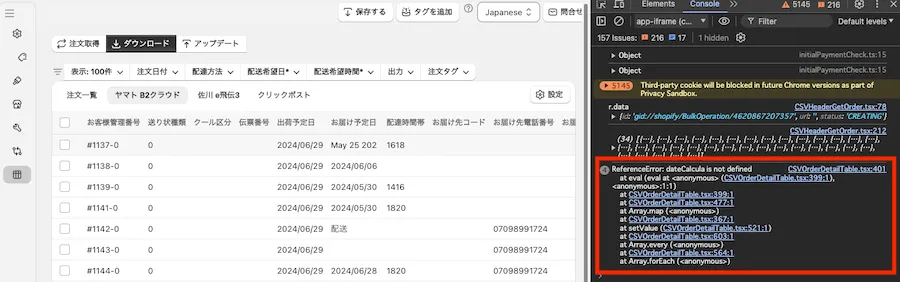 An example of an error output to the console (the image is from the old screen)
- You can test in a verification environment from the following URL. (You can verify code using variables.)
https://playcode.io/1921690
- You can test in a verification environment from the following URL. (You can verify code using variables.)
Sample code
-
Calculate the shipping date from the desired delivery date (for perishable food, etc.).
dateCalculate(order.date, -5, "YYYY/MM/DD")If the shipping date differs by delivery area, use “3. Change the output value from the order details”.
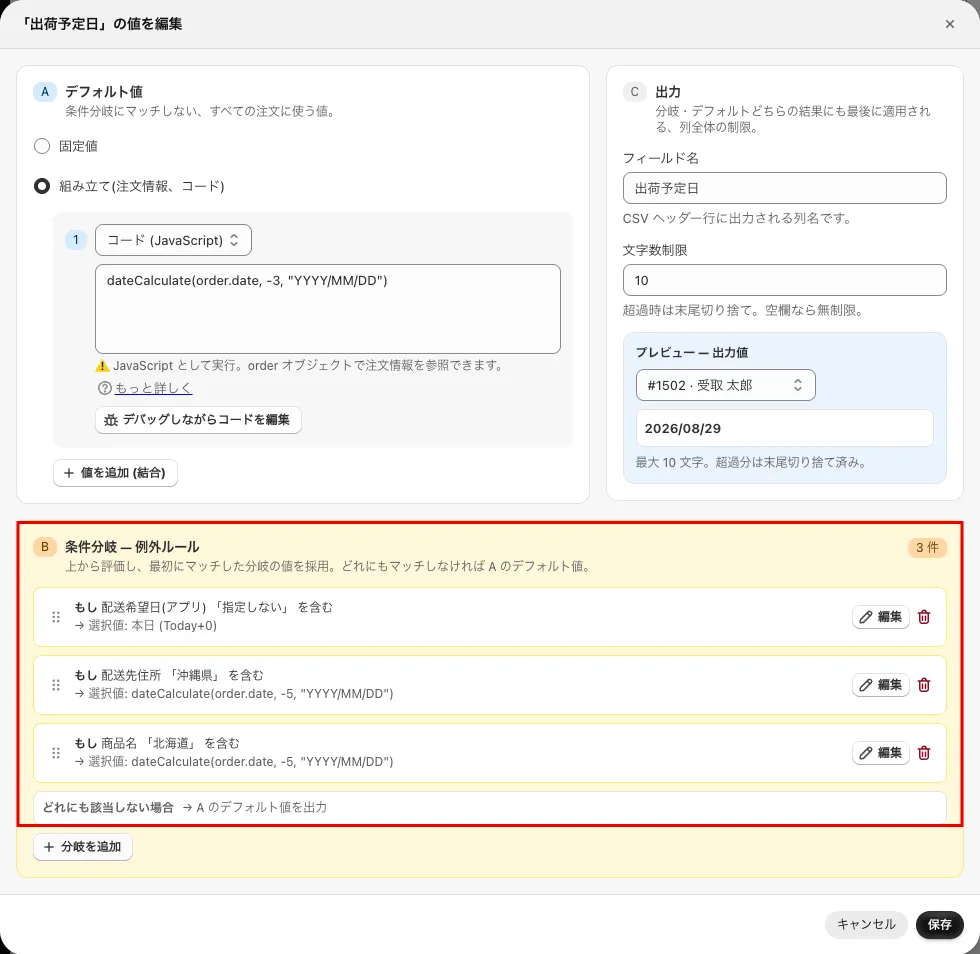 An example of “Branches — exceptions”. The default value is dateCalculate(order.date, -3, “YYYY/MM/DD”), and it is -5 days for “If the shipping address contains ‘沖縄県’ (Okinawa)” and “If the product name contains ‘北海道’ (Hokkaido)”
 -
When the desired delivery date is “No Request”, set the earliest estimated delivery date for each delivery area.
(This is a complex condition, so an immediately invoked function is used. Please adjust the branches as appropriate.)(() => { const address = order.shippingAddress.formattedArea; const format = 'YYYY/MM/DD'; if (address.includes('北海道')) { return dateCalculate(new Date(), 4, format); } else if (address.includes('青森県')) { return dateCalculate(new Date(), 3, format); } else if (address.includes('沖縄県')) { return dateCalculate(new Date(), 5, format); } else if ( address.includes('福岡県') || address.includes('佐賀県') || address.includes('長崎県') || address.includes('熊本県') || address.includes('大分県') || address.includes('宮崎県') ) { return dateCalculate(new Date(), 3, format); } else { return dateCalculate(new Date(), 2, format); } })()
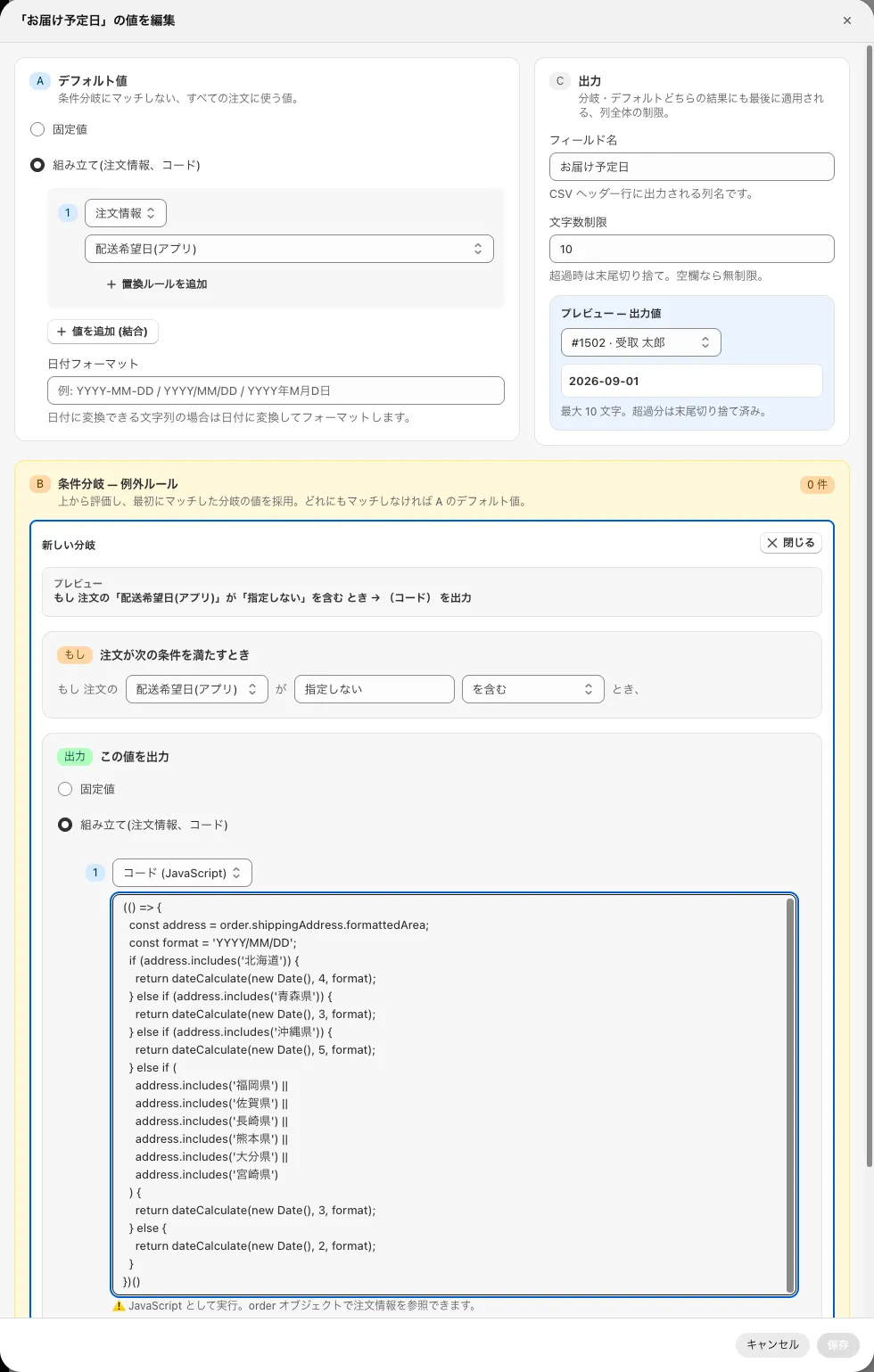 An example where the output of “If Delivery Date (App) contains ‘No Request’” is set to “Code (JavaScript)” of “Detail (order info, code)”
-
Output the purchased product names to “Item name 1” and “Item name 2”.
// The 1st product order.lineItems[0]?.title // The 2nd product order.lineItems[1]?.title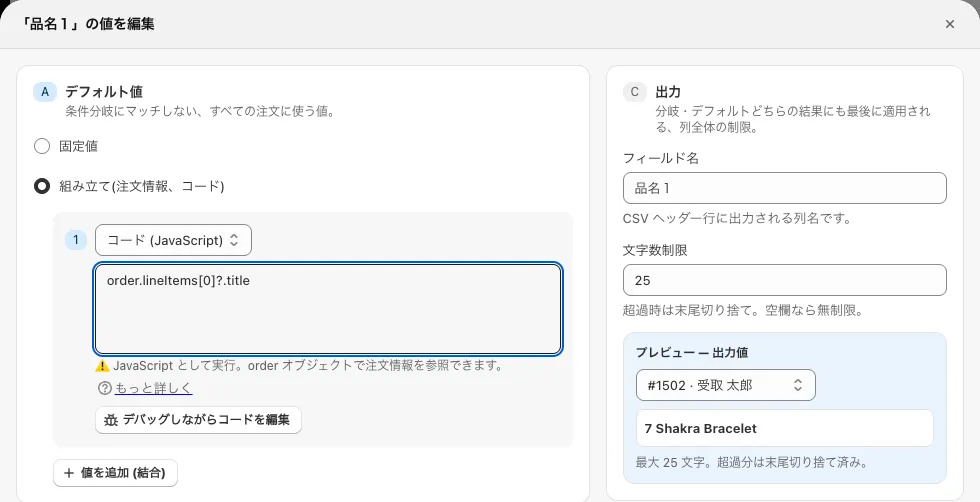 Item name 1
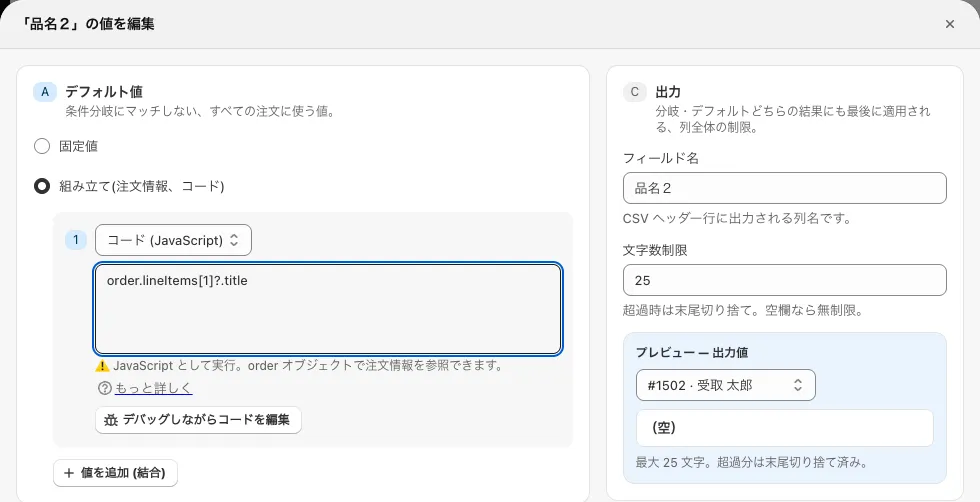 Item name 2
 -
Show the total amount minus the shipping fee.
order.currentTotalPriceSet.shopMoney.amount-order.totalShippingPriceSet.shopMoney.amount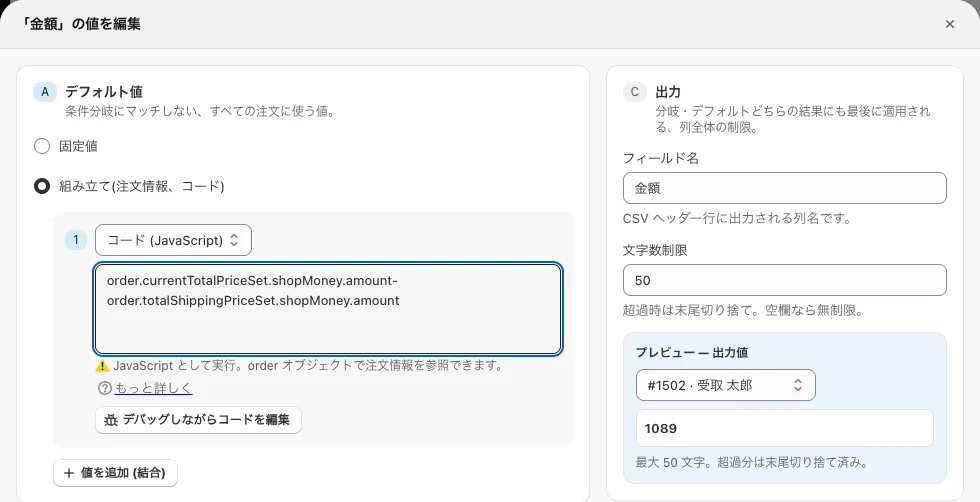 An example of the amount item
 -
Convert the recipient’s phone number into a string with hyphens (-). (To prevent garbled text in Excel.)
(()=>{ const tel = order.shippingAddress.phone?.replace("+81","0") if (/^0[789]0\d{8}$/.test(tel)) { return tel.replace(/(\d{3})(\d{4})(\d{4})/, "$1-$2-$3"); } else if (/^0\d{9,10}$/.test(tel)) { return tel.replace(/(\d{4})(\d{2})(\d{4})/, "$1-$2-$3"); } else { return tel; } })()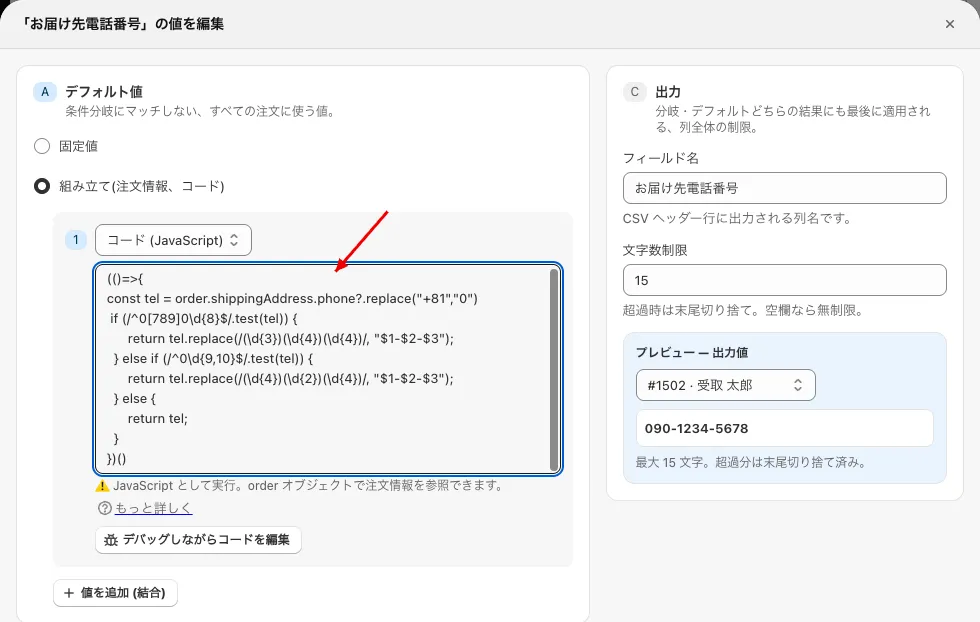 An example of the recipient’s phone number item
 -
Convert the sender’s phone number into a string with hyphens (-). (To prevent garbled text in Excel.)
(()=>{ const tel = order.billingAddress.phone?.replace("+81","0") if (/^0[789]0\d{8}$/.test(tel)) { return tel.replace(/(\d{3})(\d{4})(\d{4})/, "$1-$2-$3"); } else if (/^0\d{9,10}$/.test(tel)) { return tel.replace(/(\d{4})(\d{2})(\d{4})/, "$1-$2-$3"); } else { return tel; } })()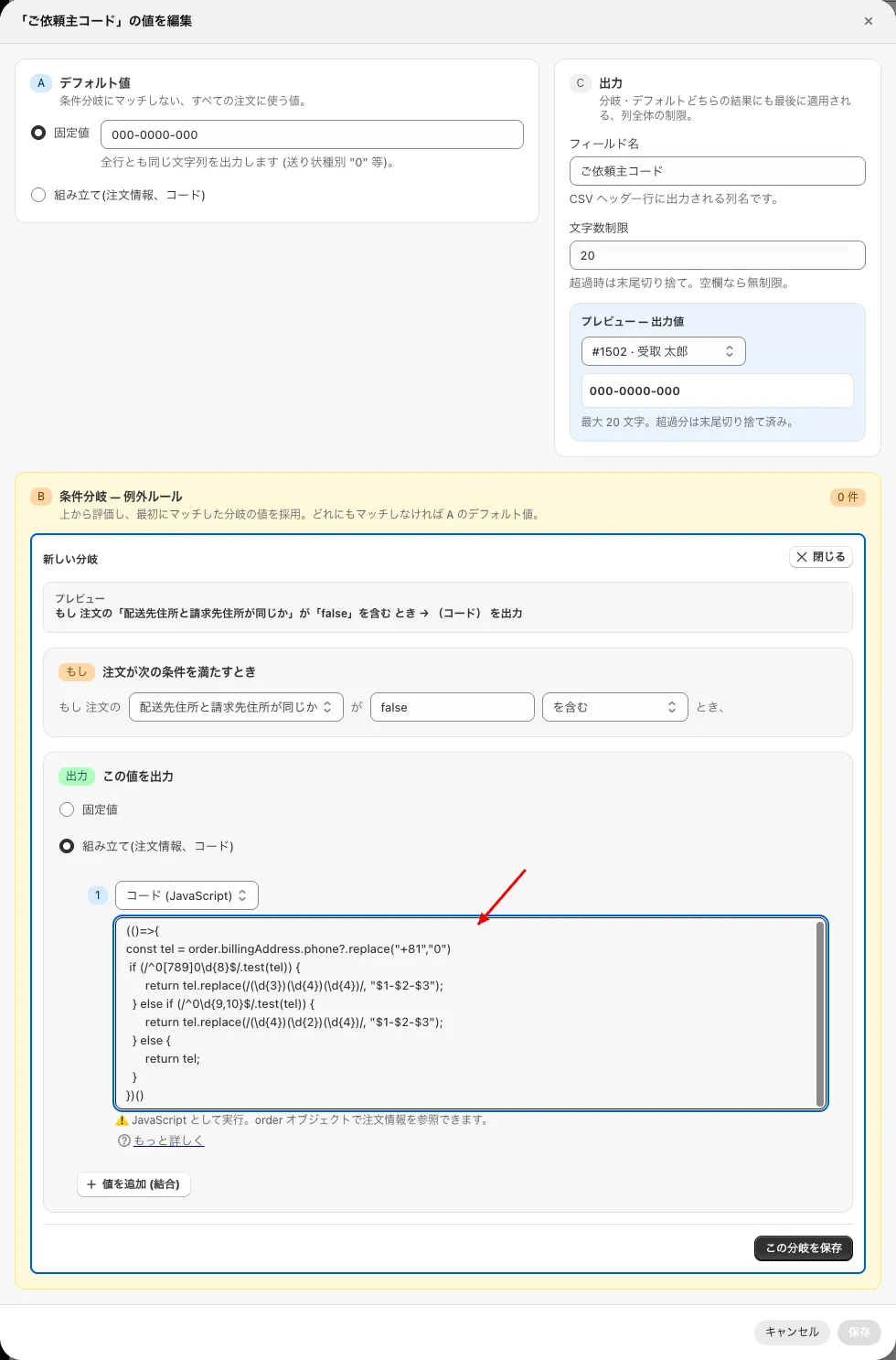 An example where code is set as the output of “If the shipping address and billing address are the same contains ‘false’” (the sender’s code item)
 -
Extract only the prefecture from the address.
(() => { const address = order.shippingAddress.formattedArea; const prefectures = [ "北海道", "青森県", "岩手県", "宮城県", "秋田県", "山形県", "福島県", "茨城県", "栃木県", "群馬県", "埼玉県", "千葉県", "東京都", "神奈川県", "新潟県", "富山県", "石川県", "福井県", "山梨県", "長野県", "岐阜県", "静岡県", "愛知県", "三重県", "滋賀県", "京都府", "大阪府", "兵庫県", "奈良県", "和歌山県", "鳥取県", "島根県", "岡山県", "広島県", "山口県", "徳島県", "香川県", "愛媛県", "高知県", "福岡県", "佐賀県", "長崎県", "熊本県", "大分県", "宮崎県", "鹿児島県", "沖縄県" ]; const prefecturePattern = new RegExp(prefectures.join('|')); const match = address.match(prefecturePattern); return match ? match[0] : null; })() -
Output the total quantity of the whole order (for 2 of product A and 2 of product B, output 4).
(()=>{ return order.lineItems.reduce((a,b)=>{ return a+b.currentQuantity },0) })() -
Output the billing phone number if there is one, and the shipping phone number if not.
(()=>{ if(order.billingAddress.phone){ return order.billingAddress.phone.replace("+81","0") } return order.shippingAddress.phone?.replace("+81","0") })() -
For a gift order only, you want the “sender” to be the billing properties, but even if you judge by whether the shipping and billing addresses are the same being false, the shipping and billing customer may in fact be the same person. Compare “the postal code of the shipping address and of the billing address” and “the last name of the shipping address and of the billing address”, and if they match, judge that it is not a gift delivery.
(An example for Yamato B2)
20 Sender’s phone number(()=>{ if(order.shippingAddress.zip===order.billingAddress.zip && order.shippingAddress.lastName===order.billingAddress.lastName){ return "080-0000-9999" } if(order.billingAddress.phone){ return order.billingAddress.phone.replace("+81","0") } return "080-0000-9999" })()22 Sender’s postal code
(()=>{
if(order.shippingAddress.zip===order.billingAddress.zip && order.shippingAddress.lastName===order.billingAddress.lastName){
return "889-0000"
}
return order.billingAddress.zip
})()
23 Sender’s address
(()=>{
if(order.shippingAddress.zip===order.billingAddress.zip && order.shippingAddress.lastName===order.billingAddress.lastName){
return "Default address"
}
return `${order.billingAddress.formattedArea.replace("日本:","")}${order.billingAddress.address1}`
})()
24 Sender’s apartment/building
(()=>{
if(order.shippingAddress.zip===order.billingAddress.zip && order.shippingAddress.lastName===order.billingAddress.lastName){
return "Default apartment/building"
}
return order.billingAddress.address2
})()
25 Sender’s name
(()=>{
if(order.shippingAddress.zip===order.billingAddress.zip && order.shippingAddress.lastName===order.billingAddress.lastName){
return "Default name"
}
return `${order.billingAddress.lastName}${order.billingAddress.firstName}`
})()