Product Groups
You can create groups for each product and set delivery dates and times for each group.
- ex) The earliest delivery date for regular products is 3 days, and the earliest delivery date for large furniture is 6 days.
- ex) Some products can be picked up in-store and others cannot.
Setting method
-
Turn on the checkbox “Enable product groups”.
Open the app > Home > “Settings overview” > “Delivery date settings” > card “Targeted products”.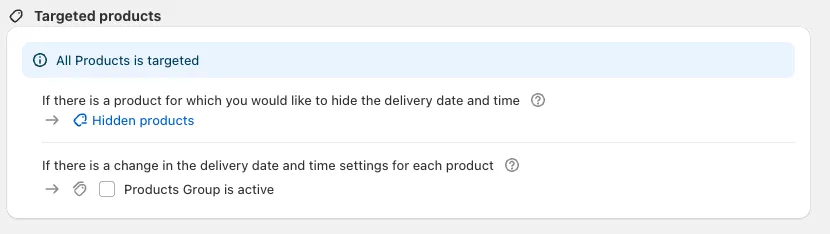 App settings
-
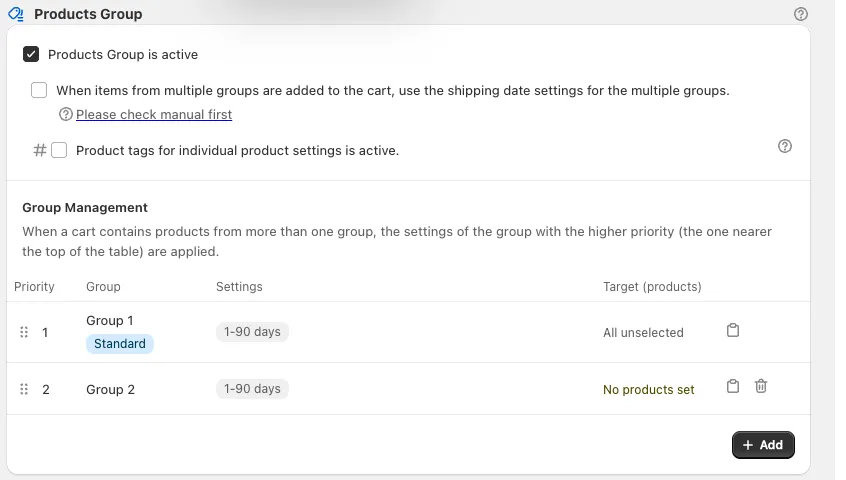
Create a group with “Add” under “Group Management” in the card “Product Groups” (the group list page, “Delivery date settings”), and link products to the created group in the “Group” column of the card “Product Management” on the same screen. (If you have a large number of products, please consider setting product tags.)
-
Standard
The standard group defaults to the product delivery date and time settings. Set the basic delivery date and time settings to the standard group. -
Priority
When a cart contains products from more than one group, this is the order that decides which group’s settings are used. The settings of the group with the higher priority (the smaller number, nearer the top of the table) are applied. Change the order by dragging the ⠿ handle at the left of a row in the “Group Management” table (there are no up/down buttons). The group nearer the top has the higher priority. The order is confirmed with “Save” in the save bar at the top of the screen. (For example, if group 1 has a minimum delivery date of 6 days and group 2 has a minimum delivery date of 10 days, if you want to prioritize the long minimum delivery date, set group 2 as priority 1.) -
Settings
Open a group from its row in the table (or from the group in the list on the left of the settings screen) to set the delivery date and time of that group.
 App settings